We may earn a commission from links on this page, at no extra cost to you. Picks are researched, not sponsored.
The rear screen lies. It looks bright in a dark room and washed out in sunlight, so a photo that looks fine on the screen can be badly exposed. The histogram does not lie. It is the most honest exposure tool your camera has, and it confirms what the light meter only guessed at.
What a histogram shows
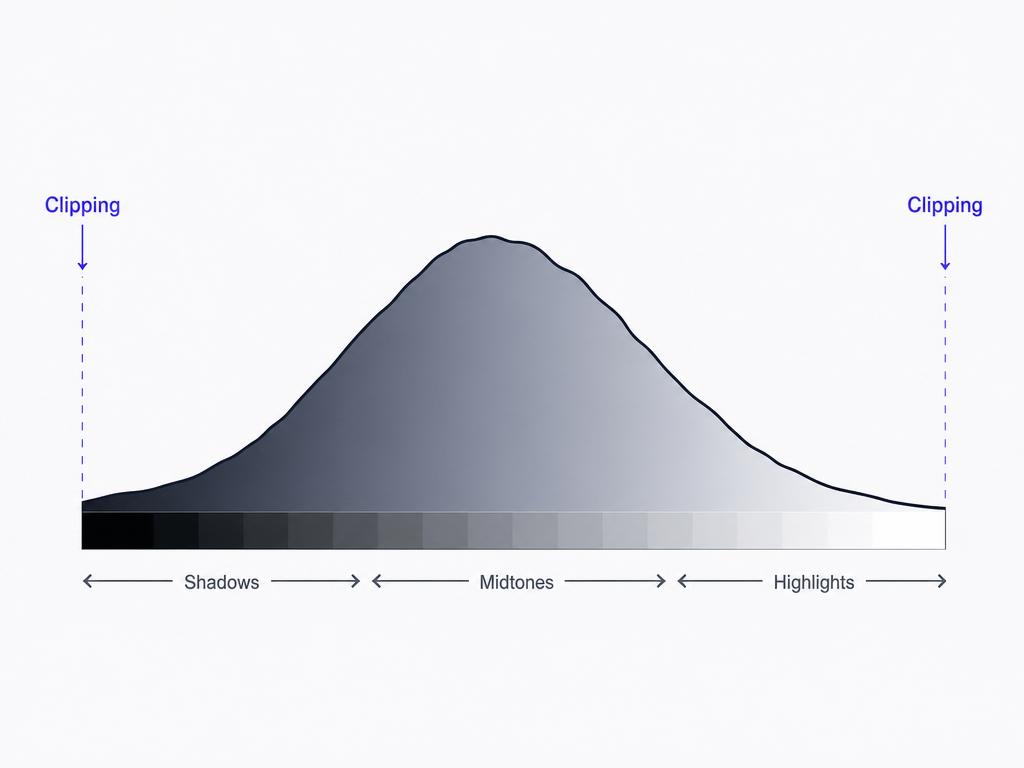
The horizontal axis is brightness: pure black at the far left, mid-tones in the middle, pure white at the far right. The vertical axis is how many pixels sit at each level. A tall spike means many pixels of that brightness; a low area means few.
There is no single correct shape. A bright snowy scene leans right, a dark night scene leans left, and both can be correct. What you are watching for is data falling off the edges.

Reading the edges: clipping
Clipping is when tones get pushed past the edge of the graph and lose all detail.
- Left edge spike (shadow clipping): pixels are pure black with no recoverable detail. Some is normal in a dark scene; a tall wall against the left edge means you crushed the shadows.
- Right edge spike (highlight clipping): pixels are pure white with no detail. This is usually worse, because blown highlights cannot be recovered in editing. A bright sky often clips; use the white-sky diagnosis to separate actual clipping from a naturally flat sky.
Many cameras also offer a blinking "blinkies" overlay that flashes the clipped areas directly on the image, which is faster to read at a glance than the graph itself.

Using it to fix exposure
When you see clipping you do not want, adjust and reshoot:
- Highlights clipped on the right? Reduce exposure. Drop the ISO, use a faster shutter speed, or dial in negative exposure compensation.
- Shadows clipped on the left? Add exposure. Open the aperture, slow the shutter, or add positive compensation.
- Both edges clipping at once? The scene's contrast is wider than the sensor can hold. Expose for the highlights and lift shadows later, or use a graduated filter or bracketing.
A balanced daylight starting point like f/8 · 1/250 · ISO 200 usually produces a histogram that sits comfortably inside both edges.
Common mistakes
- Judging exposure by the rear screen. Its brightness changes with ambient light. The histogram is consistent. Trust the graph.
- Aiming for a centered bell curve every time. There is no ideal shape. A low-key portrait should lean left; a high-key one should lean right.
- Ignoring highlight clipping because the screen looked fine. Blown highlights are gone for good. Catch them on the histogram before you leave the scene.
- Watching only the combined histogram. A single color channel can clip while the overall graph looks safe, which shows up as color shifts in skies and skin. Switch to the RGB histogram for critical work.
This is the verification step for every other control in the exposure triangle, and the exposure calculator helps you predict which way to adjust before you check.
What does a good histogram look like?
There is no universal good shape. A correct histogram is one where the important tones are not clipped against either edge. Bright scenes lean right, dark scenes lean left, and both can be exposed correctly.
Is it better to clip shadows or highlights?
Clip shadows before highlights when you must choose. Shadow detail is often recoverable in editing, while blown highlights are usually gone for good. This is why many photographers expose to protect the right side of the graph.
Should I check the histogram on every shot?
Not every frame, but check it whenever the light changes or the scene is high contrast. In tricky light, the histogram catches exposure errors that the rear screen hides.
Keep going
Next useful steps
Pick one. Each link continues the same job without starting the research over.
Related Learn guides

Content Credentials and C2PA Explained for Photographers
Content Credentials record a photo's signed provenance and edits. Learn what C2PA proves, what it cannot prove, and how capture-to-export workflows work.
Open Gate Video Explained: When 3:2 Is Worth It
Open Gate records a taller sensor area for flexible 16:9, 9:16, and square crops. See when it helps, what it costs, and how to frame it correctly.
Pre-Capture Photography Explained: Get the Frame Before the Click
Pre-Capture buffers photos before the shutter is fully pressed. Learn how it works, which settings change, and when RAW, flash, or focus may be limited.
RAW vs JPEG: Which File Format Should You Shoot?
RAW keeps all your sensor data for maximum editing freedom; JPEG is smaller and ready to share. Here is how they differ and when each one is the right call.
Researched, not personally tested: picks compare specifications, available owner feedback, and established expert sources. As an Amazon Associate I earn from qualifying purchases. We may earn a commission from links here, at no extra cost to you. How we research →