We may earn a commission from links on this page, at no extra cost to you. Picks are researched, not sponsored.
Top pick
DJI Osmo Pocket 4
9.0
Aperture Score · 1
- Best if
- 4K/240 slow motion
- Skip if
- No official U.S. sales channel
Check the exact listing
Confirm lens mount, sensor format, battery, charger, and kit contents.
DJI's names make this sound like a simple quality ladder. It is not quite that neat. The profile names describe how the camera maps brightness and color before the video is compressed. The camera model, bit depth, recording codec, and available LUT matter just as much as the name on the menu.
For the larger picture, start with the video codecs, formats, Log, and RAW guide. It separates the file container, codec, bit depth, chroma, profile, and bitrate so you can see which decision you are actually making.
The short answer
| Profile | What it is for | Choose it when | Skip it when |
|---|---|---|---|
| Standard color | Finished-looking footage | You need a quick edit or direct delivery | The scene has difficult contrast and you plan to grade |
| D-Log M | A milder flat profile for many DJI creator cameras | You want more room for highlights and color correction | You will never correct the footage |
| D-Log | A deeper DJI Log workflow on selected cameras | You have a controlled grade and a supported LUT or color pipeline | You are using a small camera for fast social clips |
| D-Log2 | A newer DJI Log option on selected models | Your camera supports it and the project needs its additional grading latitude | You are assuming the name works across every DJI camera |
The important word is selected. DJI does not give every camera the same profiles. Its support table lists D-Log, D-Log M, and D-Log2 by model, and it lists LUT availability separately. Check the exact camera rather than choosing from the name alone. DJI's current support table is the useful reference when the camera menu and an online guide disagree.
What D-Log M means
D-Log M is a lower-contrast, flatter color mode designed to preserve more information in bright and dark parts of the scene for later correction. DJI describes it as a flat color profile, not a LUT. The LUT is the conversion step you may apply later to turn that flat footage into a normal Rec.709-looking image.
That makes D-Log M a sensible choice for a creator camera. It gives you some protection against bright windows, pale skies, snow, and hard sun, but it does not demand the same level of discipline as a deeper cinema workflow. The Osmo Pocket 3 FAQ specifically describes its D-Log M mode as a lower-contrast profile intended to expand post-processing options.
Use D-Log M when:
- The camera records it in 10-bit.
- You can expose consistently and apply a conversion LUT or make a basic correction.
- You need to match clips from a drone, action camera, or pocket camera.
- The scene has a bright sky, window, water, or white wall that standard color might clip.
Do not use it just because the image looks more professional in the menu. If you need to send clips straight from the camera to a client or phone, standard color is often the more professional choice because it arrives finished.
What D-Log means
D-Log is DJI's more traditional Log workflow. In practice, it appears on selected drones, cinema-oriented cameras, and other DJI systems rather than acting as a universal mode across the product line. The footage is intentionally flat, so it needs a proper transform or a deliberate manual grade before it looks normal.
D-Log is a good fit for a controlled production where you already know the camera, the exposure method, the monitoring setup, and the post workflow. It is a poor fit for a quick clip when nobody has time to check the image before delivery.
The mistake is treating D-Log as automatically better than D-Log M. A profile is only useful when the camera records enough information to support it and the person grading it knows what to do with the file. A well-exposed 10-bit D-Log M clip can be more useful than a badly exposed deeper Log clip.
What D-Log2 means
D-Log2 is a newer DJI profile that appears on specific newer models. It is not a firmware-wide replacement for every older D-Log or D-Log M camera. DJI's current support material lists D-Log2 on selected products and provides model-specific LUT information, which is the practical clue: treat it as a camera-specific workflow, not a universal setting.
If your camera offers D-Log2, check four things before choosing it:
- Does the camera record it in 10-bit at the frame rate and resolution you actually use?
- Does DJI provide a matching LUT, and does it work in your editor?
- Can you expose it consistently while monitoring the flatter image?
- Do the card, drive, and computer handle the codec and bitrate attached to that mode?
If the answer to any of those is no, use the camera's standard profile or D-Log M option instead. The less dramatic setting is often the one that gets finished.
D-Log M is not the same as D-Log2
The names are related, but they do not describe one continuous scale that every DJI camera shares. A simple way to think about them is:
- D-Log M usually means a creator-friendly flat profile with a manageable correction.
- D-Log usually means a deeper Log workflow on a particular DJI system.
- D-Log2 means a newer, model-specific DJI Log option with its own support and LUT requirements.
The exact dynamic range, bit depth, codec, and color transform still come from the camera. Read the camera's manual and support page, not just the profile label. DJI also warns that LUTs are not interchangeable across all drone and handheld products, so a LUT that came with one model is not automatically correct for another.
What about F-Log and F-Log2?
F-Log and F-Log2 are Fujifilm profiles, not DJI profiles. The same principle applies: the profile changes the tone and color mapping, while the codec describes compression. F-Log2 is generally the flatter, higher-latitude option on supported Fujifilm cameras, but it still needs the camera's supported bit depth, a sensible exposure, and a usable conversion path.
Do not compare a profile name across brands as if the names were standards. D-Log M, F-Log2, S-Log3, C-Log3, and V-Log are brand-specific implementations. The useful comparison is the whole recording recipe: MOV · H.265 · 10-bit · 4:2:2 · Log · 200 Mbps.
The setting I would choose by job
| Job | Starting point | Why |
|---|---|---|
| Fast social clips | Standard color | No correction step and fewer surprises on a phone |
| Travel or walk-and-talk | 10-bit D-Log M | More highlight room without a heavy rig or grade |
| Drone landscape with a planned grade | D-Log or D-Log M, depending on the model | More control over bright skies and shadow detail |
| Paid work with a color-managed post team | The deepest supported 10-bit Log option | The workflow can absorb the extra latitude and correction |
| Low light | Standard color or the mildest supported Log mode | A heavy grade can make noise more obvious |
| Mixed DJI cameras | The profile and LUT combination that can be matched | Consistency is more useful than the most impressive label |
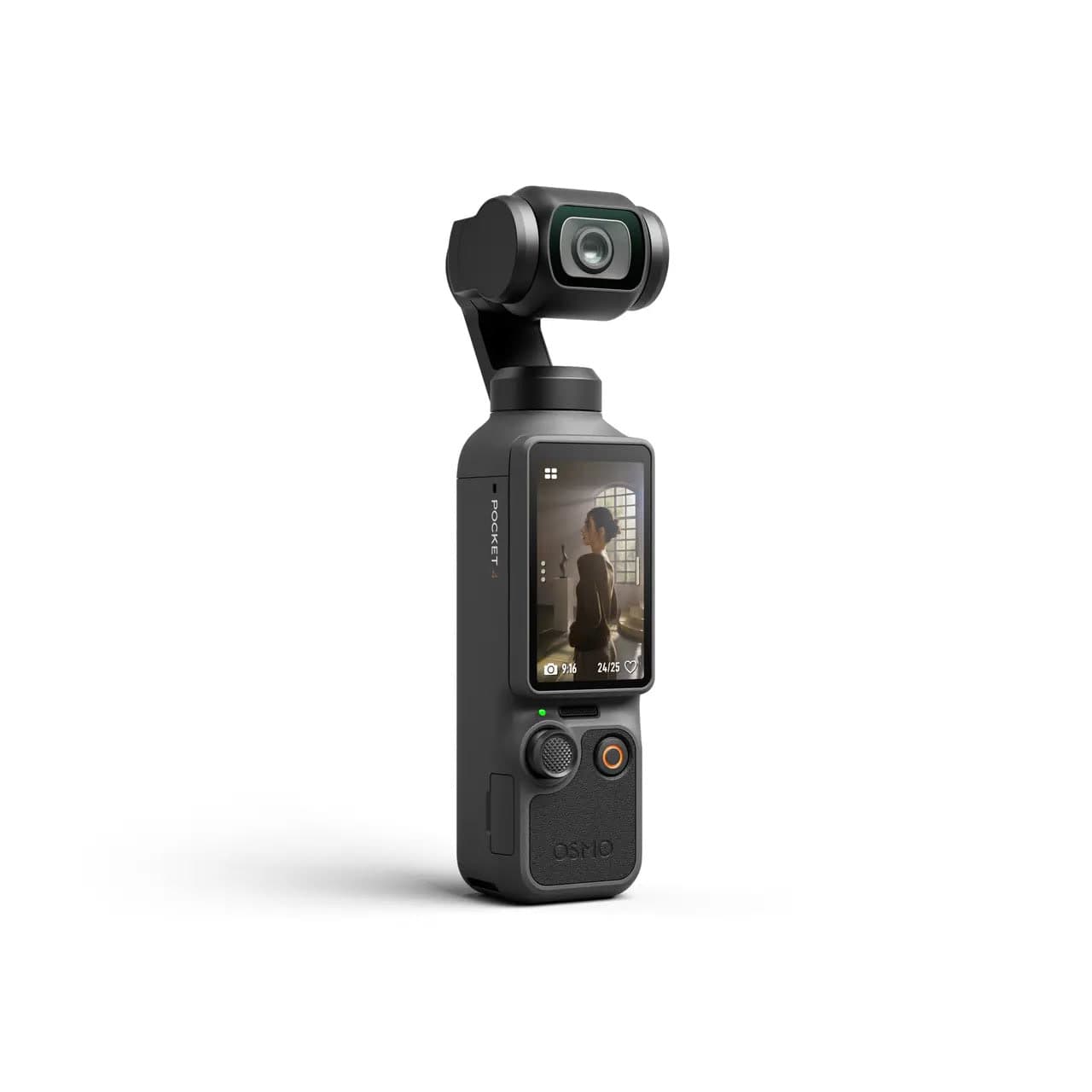
DJI Osmo Pocket 4, the current regular model in supported international markets, records 10-bit D-Log. The previous-generation Pocket 3 records 10-bit D-Log M. Both show why the exact camera matters: a newer model does not simply rename the same profile, and a LUT from one model should not be assumed to fit the other. The Luna Ultra vs Osmo Pocket 4 comparison covers the current buying and availability question.
Current DJI Model
DJI Osmo Pocket 4
Creators in supported DJI regions who want the current one-lens Pocket model and already use DJI audio.
Check price at DJI GlobalA simple grading workflow
- Copy the original files before formatting the card.
- Identify the camera and profile used for each clip.
- Apply the correct DJI-to-Rec.709 LUT if one is provided for that exact model, or correct manually.
- Adjust exposure and white balance before pushing saturation or contrast.
- Match shots from different cameras before adding a creative look.
- Export a normal delivery file such as H.264 when the destination needs broad playback.
Never use a LUT from a different DJI camera just because the filename contains D-Log M. The transform is tied to the camera's color science and the profile it recorded.
Common mistakes
Shooting Log in 8-bit
Flat profiles spread the image across a file with limited tonal steps. Push an 8-bit Log file too hard and skies, walls, or skin tones can break into bands. If the camera offers 10-bit, use it for Log. The video format decoder shows why bit depth changes the grade.
Exposing by the finished-looking preview
Log footage is supposed to look flat. Use the camera's histogram, zebras, waveform, or other exposure tools instead of trying to make the preview look pretty.
Choosing the profile before checking the codec
D-Log M in H.265 10-bit and D-Log M in another recording mode are not interchangeable files. Check the bit depth, chroma, bitrate, card requirement, and edit support as one recipe.
Treating a LUT as a finished grade
A technical LUT is a starting conversion, not a guarantee of good exposure or matching skin tones. Correct the image first, then decide how much style it needs.
The sane default
If you are unsure, use standard color for footage that must be ready immediately. Use 10-bit D-Log M when you want to grade and your camera provides a clear LUT workflow. Use D-Log or D-Log2 only after confirming the exact model, bit depth, codec, LUT, and editing path.
The camera profile is one part of the file. The useful choice is the one you can expose, store, edit, and finish.
Is D-Log M better than D-Log?
Neither is automatically better. D-Log M is usually easier to finish on a small creator camera, while D-Log can make more sense in a controlled production with a planned color workflow. Compare the whole recording recipe and the time you have to grade.
Does D-Log2 work on every DJI camera?
No. D-Log2 is model-specific. Check DJI's current support table and the manual for your exact camera before planning around it.
Should I use D-Log M on the Osmo Pocket 3?
Use it when you will correct the footage and want more room for bright skies, windows, and color matching. Use standard color when you want clips that are ready to share without a grading step.
Are D-Log, F-Log2, and S-Log3 the same thing?
No. They are brand-specific Log profiles. They share the basic idea of recording a flatter image for grading, but their tone curves, LUTs, camera support, and exposure behavior differ.
Sources
Related Learn guides

Content Credentials and C2PA Explained for Photographers
Content Credentials record a photo's signed provenance and edits. Learn what C2PA proves, what it cannot prove, and how capture-to-export workflows work.
Open Gate Video Explained: When 3:2 Is Worth It
Open Gate records a taller sensor area for flexible 16:9, 9:16, and square crops. See when it helps, what it costs, and how to frame it correctly.
Pre-Capture Photography Explained: Get the Frame Before the Click
Pre-Capture buffers photos before the shutter is fully pressed. Learn how it works, which settings change, and when RAW, flash, or focus may be limited.
RAW vs JPEG: Which File Format Should You Shoot?
RAW keeps all your sensor data for maximum editing freedom; JPEG is smaller and ready to share. Here is how they differ and when each one is the right call.
Researched, not personally tested: picks compare specifications, available owner feedback, and established expert sources. As an Amazon Associate I earn from qualifying purchases. We may earn a commission from links here, at no extra cost to you. How we research →