We may earn a commission from links on this page, at no extra cost to you. Picks are researched, not sponsored.
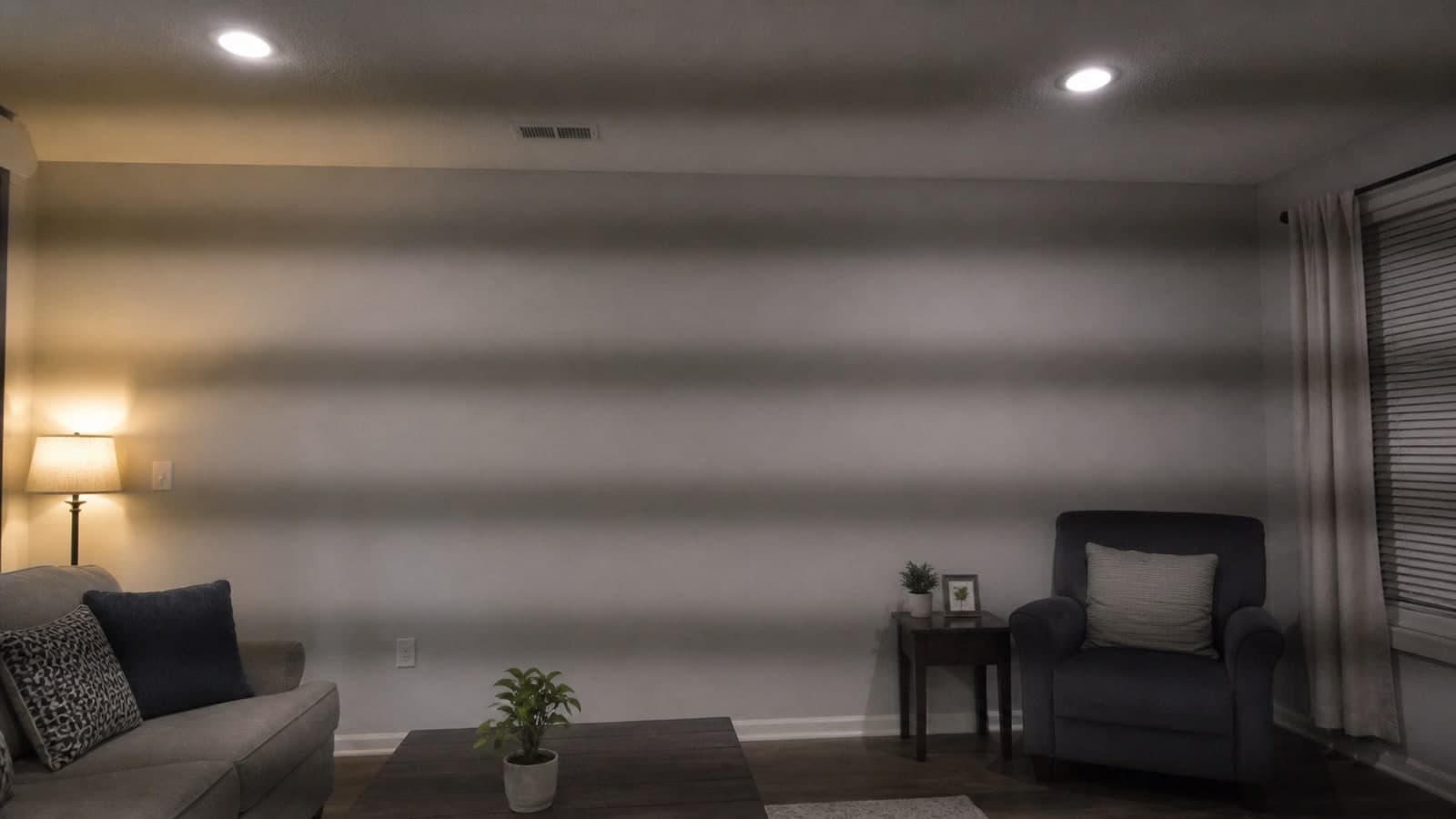
Flicker can look like pulsing brightness, rolling dark bars, or bands that appear only after recording starts. It is a timing problem between the camera and the light, not something a codec or color grade can reliably repair.
Start with the electrical frequency
Mains-powered lights commonly cycle with local electrical frequency. Sony's flicker-reduction guidance recommends testing 1/50 or 1/100 second in 50 Hz regions and 1/60 or 1/120 second in 60 Hz regions. These shutter speeds give the camera a better chance of integrating complete light cycles.
The familiar 180-degree shutter rule is a starting point for motion, not a law. Clean light is more important than holding exactly 1/48 second at 24 fps.
| What you see | Likely cause | First move |
|---|---|---|
| Whole frame pulses | Light output cycles between frames | Match shutter to 50 or 60 Hz |
| Dark bars roll through the image | Shutter scan and light cycle are out of phase | Use variable shutter or fine tuning |
| One fixture flickers, others do not | Driver or dimmer problem | Turn that fixture off and retest |
| Flicker appears only when dimmed | Pulse-width dimming at a low level | Raise fixture output and reduce light another way |
| Bands come from a screen | Display refresh mismatch | Change shutter or display refresh rate |
A clean diagnosis in six steps
1. Record a short test clip
Do not trust the live view alone. Record five seconds and play it back at normal speed. Some cameras reduce or hide flicker in the preview.
2. Try the safe shutter family
In the United States and other 60 Hz regions, start at 1/60 second. If the motion treatment needs a shorter exposure, try 1/120. In a 50 Hz region, start at 1/50 or 1/100. Keep frame rate, ISO, and aperture fixed while testing.
3. Isolate each source
Turn off practical lamps, ceiling fixtures, accent LEDs, computer screens, and the dedicated video light one at a time. Mixed lighting can hide the fact that only one source is causing the bands.
4. Test the dimmer
Some LED drivers behave cleanly at full output and pulse visibly at low output. Raise the fixture to 100 percent and control brightness by increasing distance, adding diffusion, changing aperture, lowering ISO, or using ND filtration.
5. Use variable shutter
Some cameras offer variable shutter, synchro scan, or fine shutter adjustment. Nudge the value until the bars stop moving and disappear. Sony's movie shooting guidance describes horizontal banding and discoloration as common flicker symptoms.
6. Check slow motion separately
High frame rates need faster shutters and expose more of a light's cycle behavior. A fixture that looks clean at 24p can band at 120p. Test the actual frame rate and shutter combination before the shoot.
When a dedicated light is the answer
Do not replace a light until it fails the full-output and matched-shutter tests. If a household LED, dimmer, or inexpensive panel still bands, a dedicated video light gives you more control over output, color temperature, modifiers, and placement.
Best Overall
Aputure Amaran 200x S
Creators who want one capable key light that works with any softbox.
Check price at AmazonThe amaran 200x S is a 200 W bi-color Bowens-mount fixture with a 2700 K to 6500 K range and app control, according to Aputure's current product page. It is useful when the problem is an uncontrollable room fixture and you need a dedicated key light. Still test it at the frame rate, shutter, and dimmer level you plan to use. No light should be treated as universally flicker-proof under every camera setting.
For light size, diffusion, and placement, use the video light guide. For shutter and motion choices, see shutter speed explained.
Common mistakes
Changing ISO does not synchronize the light. Applying noise reduction or a LUT does not remove rolling exposure bands. Switching codecs does not change the timing at capture. The useful controls are shutter timing, frame rate, fixture output, dimming method, and the light source itself.
Primary sources
- Sony: How to reduce flicker while recording video
- Sony: Basic settings and flicker behavior for movie shooting
- Aputure: amaran 200x S specifications
Why do LED lights flicker on camera but not to my eyes?
Your eyes blend rapid light cycles together. A camera samples those cycles at specific frame and shutter intervals, so the recording can reveal pulsing or bands that were not obvious in the room.
What shutter speed stops LED flicker?
Start with 1/60 or 1/120 second in a 60 Hz region, and 1/50 or 1/100 in a 50 Hz region. The exact clean value can vary by fixture, dimmer, and camera readout, so use variable-shutter fine tuning when available.
Can LED flicker be fixed in editing?
Minor whole-frame pulsing can sometimes be reduced, but moving bands and color shifts are difficult to remove cleanly. Fix the light and shutter timing before recording whenever possible.
Keep going
Next useful steps
Pick one. Each link continues the same job without starting the research over.
Related Learn guides

Content Credentials and C2PA Explained for Photographers
Content Credentials record a photo's signed provenance and edits. Learn what C2PA proves, what it cannot prove, and how capture-to-export workflows work.

Open Gate Video Explained: When 3:2 Is Worth It
Open Gate records a taller sensor area for flexible 16:9, 9:16, and square crops. See when it helps, what it costs, and how to frame it correctly.

Pre-Capture Photography Explained: Get the Frame Before the Click
Pre-Capture buffers photos before the shutter is fully pressed. Learn how it works, which settings change, and when RAW, flash, or focus may be limited.

RAW vs JPEG: Which File Format Should You Shoot?
RAW keeps all your sensor data for maximum editing freedom; JPEG is smaller and ready to share. Here is how they differ and when each one is the right call.
Researched, not personally tested: picks compare specifications, available owner feedback, and established expert sources. As an Amazon Associate I earn from qualifying purchases. We may earn a commission from links here, at no extra cost to you. How we research →