We may earn a commission from links on this page, at no extra cost to you. Picks are researched, not sponsored.
The Kelvin scale, the counterintuitive part first
Color temperature comes from physics. Heat a piece of metal and it glows first dull red, then orange, then white, then bluish as it gets hotter. The temperature of that glow, measured in Kelvin, is the same scale photographers borrowed to describe light. The part that trips everyone up is that the scale runs backward from how we talk about color. Low Kelvin numbers look warm and orange, high Kelvin numbers look cool and blue. A "hot" 7500K shade is the blue one; a "cool" 3200K bulb is the orange one.
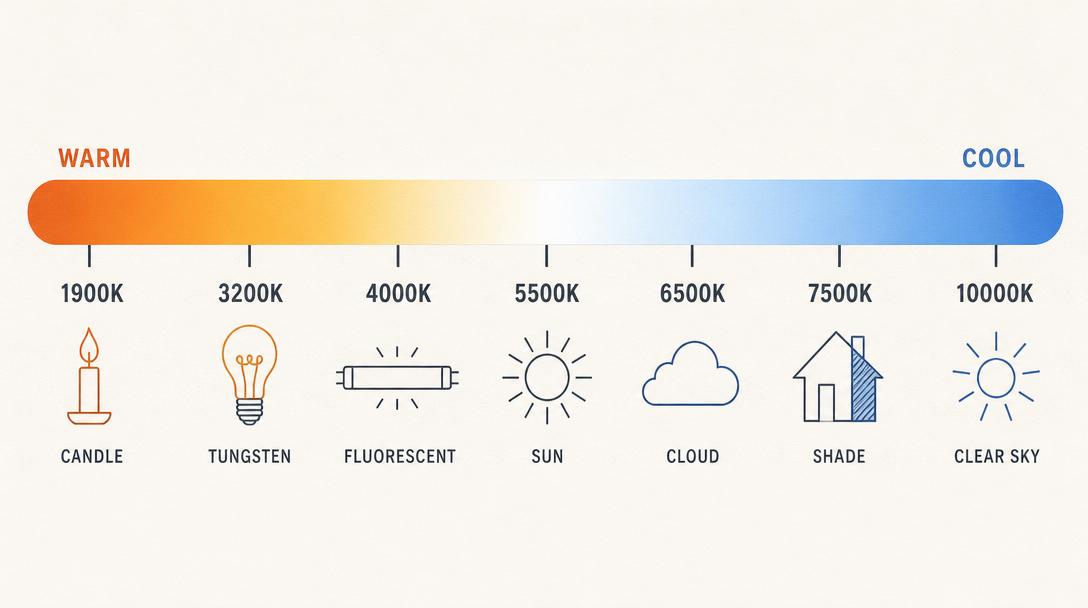
Here is the practical range you will meet in real shooting, and it is worth committing the rough numbers to memory because they let you predict a cast before you even raise the camera.
The gap between the warmest and coolest light you shoot in is enormous. Tungsten at 3200K and shade at 7500K are more than 4000K apart, which is why a single auto setting cannot carry you through a day that moves from a sunlit street into a shaded alley into a lamp-lit room.
How setting Kelvin works in camera
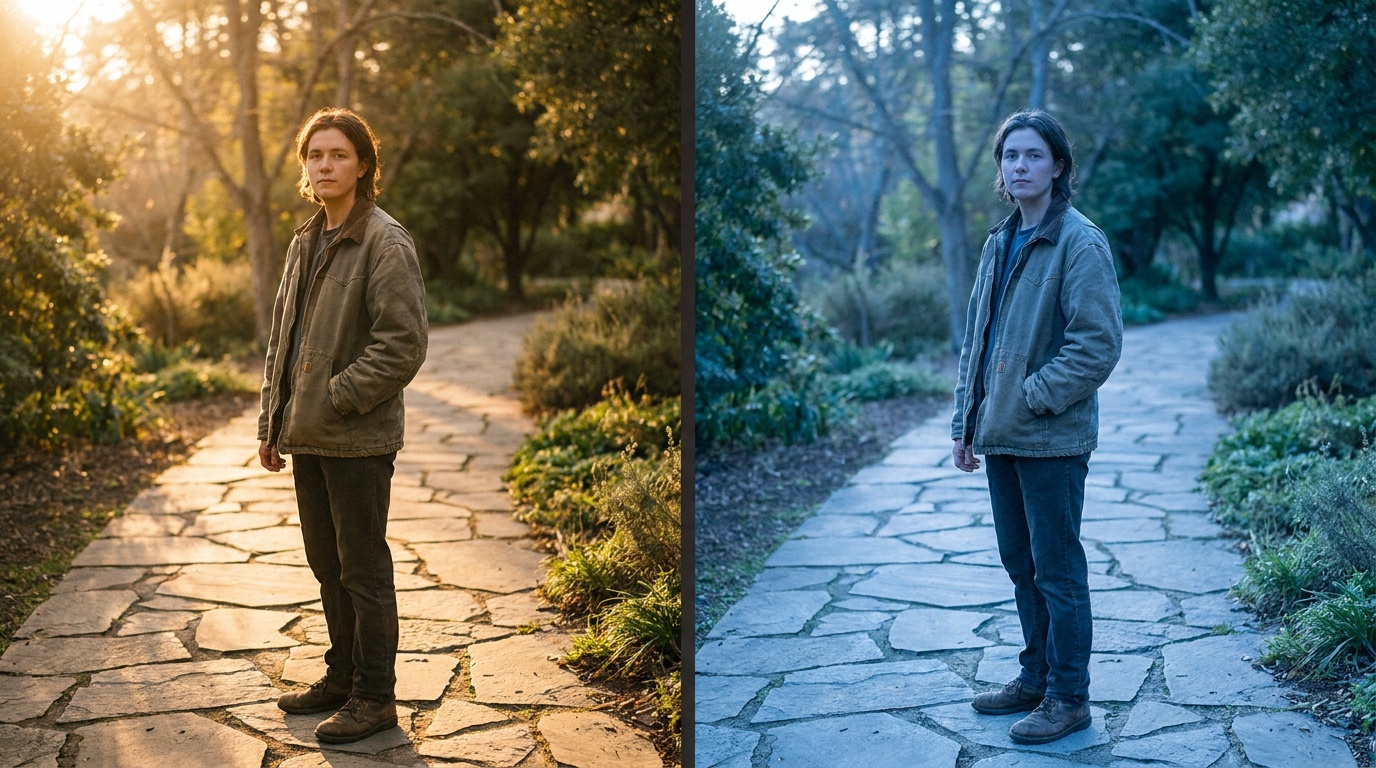
When your white balance preset says Daylight or Shade, it is just storing a Kelvin number. Most cameras also let you set the number directly, usually labeled K in the white balance menu, in steps of 100K or so. This is the most precise control you have, and it works in a way that feels backward until it clicks: the number you dial is the temperature of the light you are telling the camera to neutralize.
So if you dial in 5500K, the camera assumes the light is neutral daylight and corrects accordingly. If you then dial up to 7500K, you are telling the camera "the light is very warm," so it cools the file to compensate, and the photo gets bluer. Dial down to 3200K and you tell it "the light is cool," so it warms the file. In short: higher Kelvin setting equals warmer photo, lower Kelvin setting equals cooler photo. That is the opposite of the light scale, and remembering which direction is which is half the skill.
A quick way to anchor it: leave the camera at 5500K · daylight and look at the live view. Push toward 3200K and the whole frame cools to blue. Push toward 8000K and it warms to amber. You are not changing the light, only telling the camera what to assume about it.
The tint axis nobody mentions
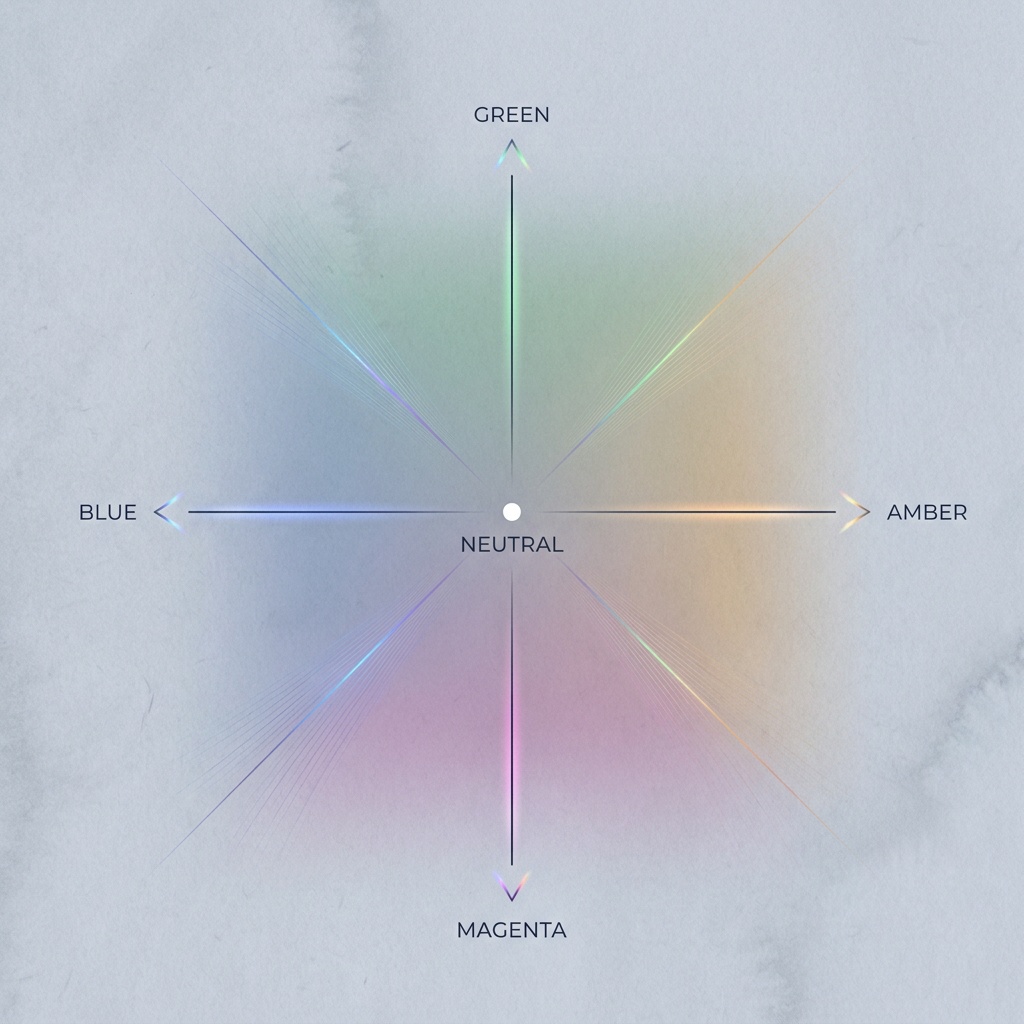
Kelvin only handles one axis, blue to amber. Real light also drifts green or magenta, which is the second white balance slider (tint, sometimes labeled green/magenta). Fluorescent tubes and many cheap LEDs push green; some film and stage lighting push magenta. If your skin tones look slightly sickly even after the Kelvin number looks right, the fix is almost always a small magenta nudge on the tint axis, not more Kelvin.
Common mistakes
The first mistake is confusing the light's temperature with the setting's effect and pushing the slider the wrong way. When a photo looks too orange, people sometimes raise the Kelvin number, which makes it worse. To cool an orange photo, lower the number. The second mistake is chasing a single perfect Kelvin value in mixed light. When two light sources sit at different temperatures in one frame, no single number satisfies both, and you have to choose which one to favor, usually the one on your subject's face.
A third mistake is dialing Kelvin by hand when you have not learned to read the result. Set a value, take a frame, and look at a known neutral in the scene. If a white wall reads warm, nudge the number down; if it reads blue, nudge it up. Two test frames usually get you there. A fourth is forgetting the tint axis entirely and fighting a green fluorescent cast with Kelvin alone, which only trades green for an orange-green muddle.
When precise Kelvin matters
Dialing exact Kelvin earns its keep in three situations. The first is matching shots across a session, where leaving the camera on auto would let the color drift frame to frame. The second is mixed or artificial light, where presets are too blunt and you want to land between two of them. The third is deliberate mood: setting a warmer-than-accurate value to push a sunset further into gold, or a cooler value to make a blue-hour landscape feel colder than neutral.
For everything else, a preset or auto is plenty, and the Kelvin number is a tool you reach for when you have a specific reason. If you shoot raw, you can also set Kelvin to the exact value after the fact, which takes the pressure off getting it perfect in the moment. The same exposure logic from the exposure triangle applies here: learn the tool, then use it only when the shot calls for it. When you do need surgical accuracy, the next step up is setting a custom white balance from a gray card.
Why does a higher Kelvin number make my photo warmer, not cooler?
Because the number describes the light you are telling the camera to neutralize, not the result. A high number says "the light is very warm," so the camera adds blue to balance it. Relative to a correct setting, raising the Kelvin value warms the photo and lowering it cools the photo. The light scale and the setting effect run in opposite directions, which is the single most confusing thing about Kelvin.
What Kelvin value should I use for indoor tungsten light?
Around 3200K, which matches a standard incandescent household bulb. If the room uses warmer or dimmer bulbs you may go a touch lower, toward 2800K. The Tungsten white balance preset sets roughly this value for you, so you only need the manual number when you want to fine-tune between presets.
Can I change Kelvin after the photo is taken?
If you shot raw, yes, completely and with no quality loss, because raw stores white balance as a tag rather than baking it in. If you shot JPEG, you can still nudge it but with much less room before colors break down. See raw vs JPEG for the difference.
What is the tint slider for if Kelvin already sets the color?
Kelvin only handles the blue to amber axis. Tint handles green to magenta, which is a separate cast that fluorescent tubes and many LEDs add. If skin still looks slightly green or sickly after the Kelvin number looks right, a small magenta tint nudge is the fix.
Keep going
Next useful steps
Pick one. Each link continues the same job without starting the research over.
Related Learn guides

Content Credentials and C2PA Explained for Photographers
Content Credentials record a photo's signed provenance and edits. Learn what C2PA proves, what it cannot prove, and how capture-to-export workflows work.
Open Gate Video Explained: When 3:2 Is Worth It
Open Gate records a taller sensor area for flexible 16:9, 9:16, and square crops. See when it helps, what it costs, and how to frame it correctly.

Pre-Capture Photography Explained: Get the Frame Before the Click
Pre-Capture buffers photos before the shutter is fully pressed. Learn how it works, which settings change, and when RAW, flash, or focus may be limited.
RAW vs JPEG: Which File Format Should You Shoot?
RAW keeps all your sensor data for maximum editing freedom; JPEG is smaller and ready to share. Here is how they differ and when each one is the right call.
Researched, not personally tested: picks compare specifications, available owner feedback, and established expert sources. As an Amazon Associate I earn from qualifying purchases. We may earn a commission from links here, at no extra cost to you. How we research →